
Industrial IoT deployments generate extraordinary volumes of data. A single modern manufacturing facility can produce tens of millions of sensor events per day – temperature readings, vibration signatures, flow rates, pressure values, power consumption metrics, and quality measurements. The challenge has never been collecting this data. The challenge is making it useful alongside the business data that gives it operational meaning.
Microsoft Fabric has become the platform of choice for enterprise analytics in industrial organisations. But until recently, the sensor data that powers operational intelligence sat outside Fabric – in Azure IoT Hub, in proprietary historians, or in time-series databases – connected to the platform through complex, brittle pipelines. That has changed. This article explains how, and what it means for organisations building Industrial IoT (IIoT) analytics at scale.
The case for unifying IIoT data with enterprise data in a single platform is not primarily technical. It is operational. The questions that matter most to industrial leaders – Why did this line go down? What is the real cost of this equipment’s downtime? Which process parameters predict quality failures three hours before they occur? – cannot be answered from sensor data alone.
Answering those questions requires correlating IoT telemetry with maintenance records from ERP, production schedules from MES, procurement data, financial cost centres, and workforce data. That correlation, at scale and in near real time, is exactly what Microsoft Fabric was built to enable. The missing piece has been getting sensor data into Fabric in a way that preserves its timestamp precision, its asset context, and its operational meaning.
Industrial sensor data has characteristics that make it challenging to integrate with enterprise analytics platforms:
Volume and velocity
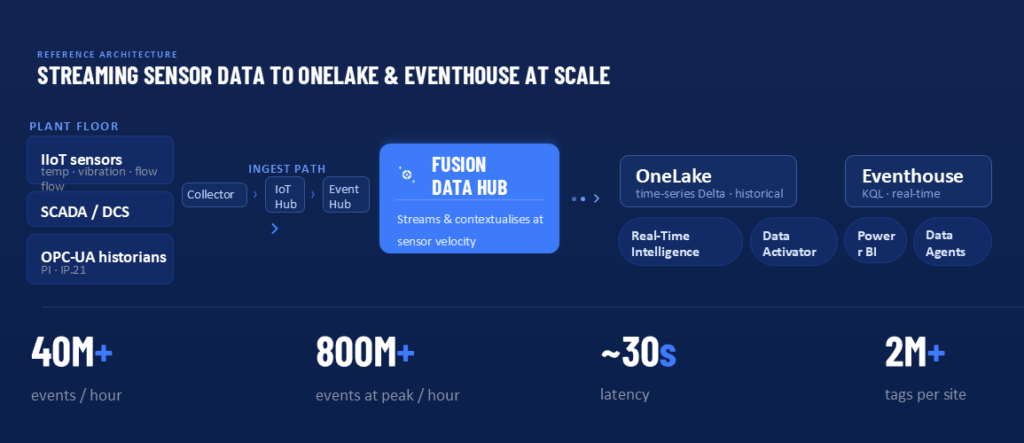
A single OPC-UA historian might log 50,000 tags at one-second intervals. A plant with multiple process units can generate billions of data points per day. Standard ETL pipelines designed for transactional data buckle under this load – and even when they scale, they introduce latency that makes near-real-time analytics impossible.
Timestamp precision and time-series structure
Industrial sensor data is inherently time-series. Values only make sense relative to each other over time. Data models that work for transactional records – rows and columns in a data warehouse – do not naturally accommodate time-series structure without specialised handling. Forcing IoT data into a generic Lakehouse schema often means losing the query patterns that make operational analytics useful.
Asset context and engineering metadata
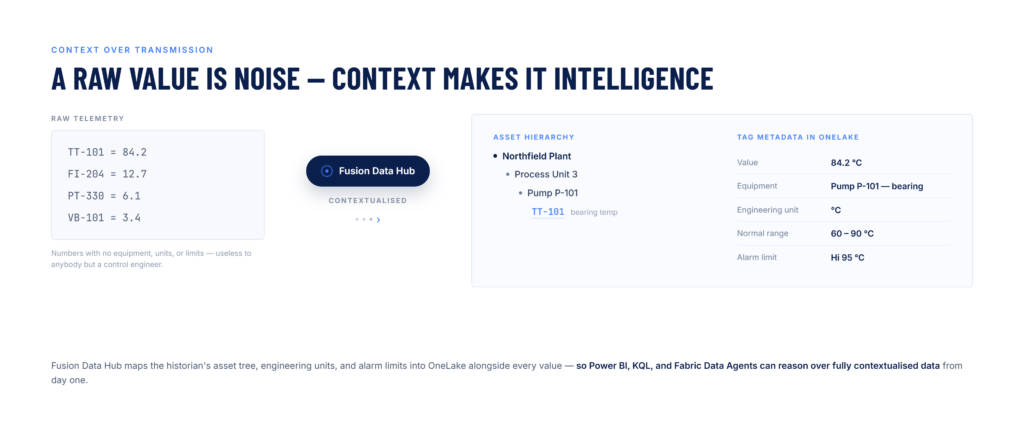
A raw sensor value is nearly meaningless without context: what equipment it came from, where that equipment sits in the plant hierarchy, what engineering unit it is measured in, what its normal operating range is, and what alarms or events occurred around it. This metadata lives in the historian or SCADA system. When IoT data is extracted without it, much of the analytical value is lost in transit.
Real-time requirements
Many industrial analytics use cases – condition monitoring, process optimisation, energy management – require data that is seconds or minutes old, not hours. Traditional batch ETL pipelines cannot meet this requirement. The architecture must support streaming ingestion alongside historical analysis, and must write to a query engine capable of real-time response.
The Microsoft Fabric Extensibility Toolkit introduced a workload model where third-party applications run inside Fabric as first-class workspace items – sharing OneLake storage, Entra ID security, and Fabric compute without requiring data movement between systems.
For industrial IoT, a native Fabric workload changes the integration architecture in four specific ways:
Sensor data flows to OneLake and Eventhouse
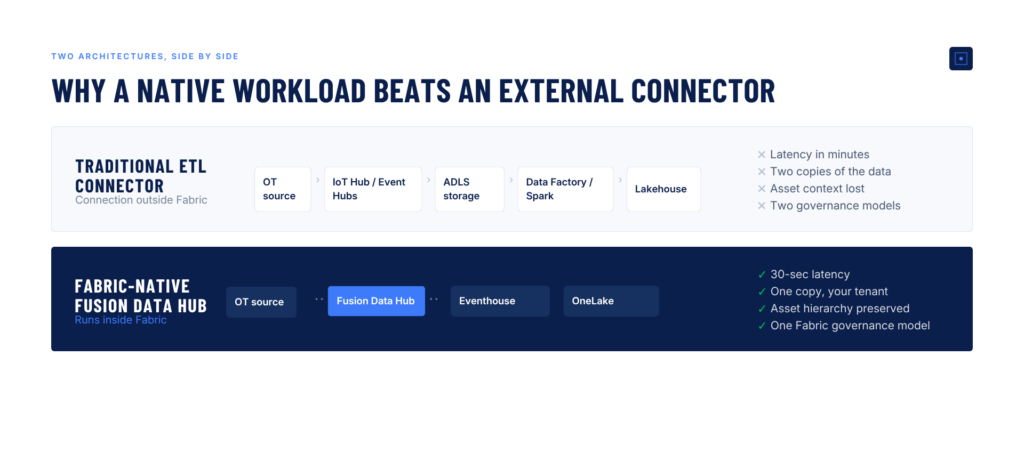
We route OT data from the Collector -> Azure IoT hub -> Event hub -> Fabric OneLake for historical analysis and to Fabric Eventhouse for Real-Time Intelligence. The data path is shorter, the latency is sub-second, and the data governance is simpler because there is only one place where your sensor data lives.
Time-series data modelled for Fabric analytics
Purpose-built industrial workloads like Fusion Data Hub organise IoT data in OneLake using schemas optimised for time-series queries – Delta Lake format, partitioned by time and asset hierarchy, with engineering unit metadata, alarm context, and equipment templates embedded alongside the values. This means Spark notebooks, Fabric Warehouse queries, KQL queries on Eventhouse, and Power BI reports all work against the same data without format conversion.
Real-Time Intelligence on live sensor streams
Because Fusion Data Hub writes streaming data directly into Fabric Eventhouse, Real-Time Intelligence dashboards are always up to date. KQL queries run on live operational data. Fabric Data Activator rules monitor conditions and fire alerts on events like process deviations, equipment state changes, or quality threshold breaches – using the same alerting engine that monitors your business data.
Asset model preservation and tag-level governance
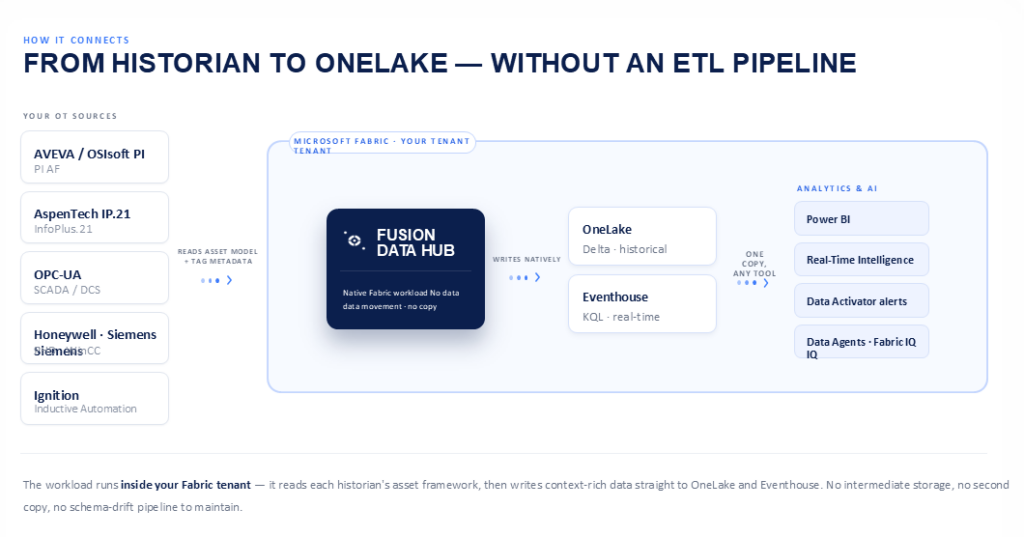
Generic IoT connectors flatten sensor data into rows, losing the hierarchical context that makes it useful. Fusion Data Hub ingests the full asset model from your source – PI AF structure, IP.21 hierarchy, OPC-UA address space – and preserves it in OneLake as queryable structured data. Tag-level filtering lets you publish only the signals your analytics need, with governance applied per tag, per group, or per asset branch.
When IIoT sensor data lives natively in OneLake alongside enterprise data, and flows in real time to Eventhouse, a new category of analytics becomes possible. The following use cases represent the highest-value applications industrial organisations are building on Microsoft Fabric today.
Predictive maintenance at scale
Correlating vibration, temperature, and current draw from rotating equipment with maintenance history from ERP and parts inventory from procurement – all in a single Fabric environment – enables predictive maintenance models that reflect the economic reality of maintenance decisions, not just technical signals from sensors. Fabric Data Science provides the training environment; Fabric Data Activator triggers work orders when model confidence crosses thresholds.
Energy and emissions management
Energy consumption is one of the largest controllable cost items in manufacturing and heavy industry. Native IoT integration enables near-real-time energy dashboards combining metered consumption from sub-meters and smart devices, production throughput from MES, carbon factor data from environmental tables, and cost data from finance – giving energy managers the full picture in one Power BI report, with Real-Time Intelligence alerts when consumption deviates from forecast.
Process quality and yield optimisation
Quality failures in continuous and batch processes often have leading indicators in process data that precede the quality event by hours. When historian time-series, batch recipe data, quality lab results, and equipment state all live in OneLake, Fabric Data Science can build models that identify these indicators – and Fabric Data Agents can surface them to operators in natural language through Fabric IQ.
OEE and production performance monitoring
Overall Equipment Effectiveness (OEE) is the standard KPI for manufacturing performance. Calculating it in near-real time requires combining downtime events from SCADA, production counts from line sensors, and quality rejection data – sources that rarely live in the same system. With sensor data streaming to Eventhouse and context preserved from the historian asset model, real-time OEE becomes a solved problem, not a data engineering project.
“We combined 4 million sensor events per hour with our ERP maintenance data in Fabric – our predictive maintenance model’s false positive rate dropped by more than half once it had the enterprise context.” — Upstream energy operator |
One of the most instructive deployments comes from Chevron. Like many industrial operators, Chevron struggled with operational data that was hard to find, hard to access, and often inconsistent or incomplete across business units. To put its time-series data to work for data scientists and engineers, Chevron needed a way to move OT data out of its on-premise historians reliably, securely, and at scale – and to standardise it once it landed in the cloud.
Working with Fusion Data Hub and Microsoft, Chevron built what its team calls a data superhighway. Fusion connects to OSIsoft PI and transfers PI history, AF asset models, tag metadata, and live stream data into Azure, where it is synchronised to Chevron’s enterprise data lake for analysis, trending, and updating at scale. Fusion solves the long-standing problem of extracting time-series data cost-effectively while minimising security risk and delivering it reliably into the customer’s own Azure tenant. As Chevron Chief Data Officer Ellen Nielsen put it, “By teaming with Fusion and Microsoft to connect and also automate the complex data, we are able to unlock the insights to help Chevron deliver on higher returns and lower carbon for our energy future.” Read more about Chevron’s journey here. The result is uncompromised, complete OT data made available across the enterprise – the same pattern Fusion Data Hub now delivers natively into OneLake and Eventhouse on Microsoft Fabric.
Not all IoT integrations for Microsoft Fabric are built equally. When evaluating options, industrial organisations should ask:
Before scoping an implementation, it is worth understanding whether your current IIoT environment is Fabric-ready. We have put together a free checklist covering source inventory, data volume estimation, network topology, and governance prerequisites.
Unify Plant Data with Fabric – Start Here
Fusion Data Hub is the only GA industrial analytics workload built natively on Microsoft Fabric. It is certified, listed on Microsoft AppSource, and in active deployment with top-tier manufacturers and energy companies. Evaluate it against your environment in a free 30-minute assessment. Our team will audit your IIoT sources, map them to a Fabric architecture covering OneLake, Eventhouse, and Real-Time Intelligence, and give you a custom scope, capacity estimate, and implementation timeline at no cost. Click for a free trial.
Fusion Data Hub workload is now available in Fabric and can be deployed from within the customer’s Fabric tenant via native workload configuration.
Learn more: https://www.fusiondatahub.com/fusion-in-fabric
Documentation: https://docs.fusiondatahub.com/fabric
Request a demo: https://www.fusiondatahub.com/contact
Fusion Data Hub workload on Fabric link: https://app.fabric.microsoft.com/workloadhub/detail/FusionDataHub.Fusion.Fusion?experience=fabric-developer
If your organisation runs Microsoft Fabric for enterprise analytics but still manages SCADA, PI Server, IP.21, and OPC-UA data separately, you are not alone. Nearly every industrial company that has adopted Fabric faces the same architectural problem: operational technology (OT) data and information technology (IT) data live in different worlds – governed by different teams, stored in different systems, and analysed in different tools.
This article explains why traditional approaches to connecting SCADA data to Microsoft Fabric create more problems than they solve, how Fabric-native workloads fundamentally change the architecture, and what organisations should look for when evaluating options. If you want the short version: the newest generation of native Fabric workloads eliminates the ETL pipeline entirely – while preserving the asset hierarchy, engineering metadata, and tag-level governance that make industrial data useful in the first place.
SCADA systems and industrial historians have been collecting operational data for decades. They know your processes intimately – every temperature reading, valve state, flow rate, alarm event, and batch record is logged with millisecond precision. That data is extraordinarily valuable. The problem is getting it into Fabric in a way that actually delivers on its value.
Most organisations attempting SCADA data integration with Microsoft Fabric fall into one of three patterns. Each works to a degree. Each has significant drawbacks.
Pattern 1: Azure IoT Hub or Event Hubs as a bridge
The most common appro ach routes SCADA telemetry through Azure IoT Hub or Event Hubs into a storage layer, then uses Fabric Data Factory or Spark notebooks to transform and load it into a Lakehouse. This works – but at a cost. The pipeline introduces latency measured in minutes rather than milliseconds, requires ongoing maintenance, and means your operational data is never truly in sync with your enterprise data. You end up with two copies of the truth.
Pattern 2: Direct database replication from historians
Some historians offer ODBC, REST, or JDBC connectors. Teams use these to pull data into Azure Blob Storage or ADLS Gen2, then shortcut it into OneLake. Again, this works – but you are now maintaining a replication job, dealing with schema drift every time a new tag is added, and managing access policies in two places simultaneously. Worse, the asset hierarchy and equipment metadata from the historian is typically lost during the export.
Pattern 3: A parallel analytics stack for OT
Many industrial organisations simply give up on unification and maintain a separate analytics environment for OT data – PI Vision, Honeywell UniSim, or similar historian analytics tools – alongside Fabric. This means your AI agents, Copilot experiences, and Power BI dashboards can never reason over the complete picture. Operational context is permanently missing from enterprise decisions.
The real cost of OT-IT data silos is not technical debt. It is the operational intelligence you cannot build because your AI systems cannot see your process data – and the asset context that gets lost every time data crosses a boundary.
The Microsoft Fabric Extensibility Toolkit, announced as generally available at FabCon 2026, introduced a new integration model. Instead of connecting to Fabric from outside, ISV workloads now run inside Fabric – as first-class workspace items with inherited security, shared OneLake storage, native Eventhouse integration, and no separate login or data copy.
For SCADA and historian data, this is not a marginal improvement. It is a fundamental architectural shift, and it matters for five specific reasons that external connectors cannot match:
1. No data movement, no data duplication
A native workload reads directly from your OT sources and writes to OneLake in your tenant. The data never leaves your environment, and there is no second copy sitting in an intermediate storage layer. For governance, compliance, and cost, this is the single most consequential difference.
2. Asset hierarchy and tag-level context preserved
This is where Fusion Data Hub differs fundamentally from simple connectors, and it is the point most ETL pipelines miss. A raw sensor value is nearly useless without context: what equipment it came from, where that equipment sits in the plant hierarchy, what engineering unit it is measured in, what its normal operating range is, and what alarms fired around it. Fusion Data Hub captures this context natively – mapping your historian’s asset tree, tag metadata, equipment templates, and engineering units into OneLake as structured data that Fabric analytics can actually reason over. Tag-level filtering lets you publish only the signals you need, with the governance you require.
3. Native Eventhouse integration for real-time intelligence
Fusion Data Hub writes streaming sensor data directly to Fabric Eventhouse, which means KQL queries, Real-Time Intelligence dashboards, and Fabric Data Activator alerts work on live operational data. This is not possible with batch ETL approaches, and it is critical for condition monitoring, process deviation detection, and any use case where the value of data decays quickly.
4. Inherited Fabric security – one governance model, not two
Native workloads inherit workspace roles and Microsoft Entra ID security groups automatically. Row-level security policies apply consistently. The same Fabric administrator who controls access to your data warehouse controls access to your historian data. There is no separate OT access management system to maintain alongside your Fabric governance model.
Rather than describing integration abstractly, here is what actually happens when you install the Fusion Data Hub workload from the Microsoft Fabric Workload Hub and connect your first source:
Source connection – PI Server, OPC-UA, SCADA and more
Fusion Data Hub includes production-ready connectors for the historian and SCADA systems that industrial organisations actually run: OSIsoft PI / AVEVA PI Server, AspenTech IP.21 (Aspen InfoPlus.21), Honeywell PHD and Uniformance, Siemens WinCC and SIMATIC historians, Ignition SCADA by Inductive Automation, and any OPC-UA compliant source.
Asset model ingestion and contextualisation
Before a single value flows, Fusion Data Hub reads your historian’s asset framework – PI AF, or OPC-UA address space – and maps it to a structured model in OneLake. Tag metadata, engineering units, equipment templates, and hierarchical relationships are preserved. This is the step that makes downstream analytics meaningful and is almost always missing from DIY ETL approaches.
Streaming to OneLake and Eventhouse
Recent sensor values stream to Fabric Eventhouse live for Real-Time Intelligence workloads. Historical data is written to OneLake in Delta Lake format, partitioned by time and asset hierarchy for efficient Spark and T-SQL queries. The same semantic model serves both – meaning a Power BI report, a KQL query, and a Fabric Data Agent all query the same data without format conversion or duplication.
Governance, lineage, and Purview integration
Because data lands natively in OneLake, it is automatically visible to Microsoft Purview for cataloguing, sensitivity labelling, and lineage tracking. Tag-level access policies, row-level security, and column masking apply consistently. Fusion Data Hub writes metadata in a way that Purview understands – so your industrial data is governed with the same rigour as your financial and HR data from day one.
For data architects designing Fabric-based platforms, and for digital transformation leads accountable for operational analytics outcomes, a native workload changes the conversation in specific ways:
Fusion Data Hub is being evaluated and deployed by top-tier energy, materials, and heavy manufacturing organisations – including publicly referenced deployments in North American steel manufacturing and upstream oil and gas operations. These organisations share a common profile: significant existing investment in Microsoft Fabric, a large installed base of historians, and digital transformation programs that cannot succeed without unifying OT and IT data on a single platform.
To understand exactly what a deployment would look like in your environment, book a no-cost pilot consultation. Our team will audit your historian and SCADA sources, map them to a Fabric OneLake and Eventhouse architecture, and give you a custom scope, capacity estimate, and implementation timeline at no cost. Learn more about Fusion Data Hub or explore the full documentation.
Read a short checklist of Fusion Data Hub Workload on Fabric Implementation Timeline. What to Expect

Fusion Data Hub
7405 Rte Transcanadienne
Suite 100
Montreal, QC H4T 1Z2
Canada
Email: [email protected]
© Fusion Data Hub 2025. All rights reserved. Fusion Data Hub is part of Aspire Software, a division of Valsoft Corporation.